
Claude Code is my daily main tool for AI-assisted coding. Out of the box it already works well, but there are a few things I’ve customized.
Shell alias
I’m too lazy to type out the complete command every time. That’s why I added the following alias to my .zshrc config:
alias cc='claude --dangerously-skip-permissions'So now I only have to type cc to start Claude Code.
My personal CLAUDE.md
In addition to the CLAUDE.md in the project, Claude Code also allows a global file at ~/.claude/CLAUDE.md. It is always loaded, no matter which repo I’m currently in. As a freelancer, I constantly jump between tech stacks, so it’s worth storing cross-stack things centrally. Mine says, for example, that Python projects should use uv and ruff, or that “discuss” and “show me” mean: explain, don’t code.
Custom statusline-command.sh
Claude Code allows you to customize the statusline at the bottom via a shell script. You can of course have Claude Code write the script, but I simply copied it from this article:
#!/bin/bash
input=$(cat)

# Extract data from JSON
cwd=$(echo "$input" | jq -r '.workspace.current_dir')
input_tokens=$(echo "$input" | jq -r '.context_window.current_usage.input_tokens // 0')
cache_creation=$(echo "$input" | jq -r '.context_window.current_usage.cache_creation_input_tokens // 0')
cache_read=$(echo "$input" | jq -r '.context_window.current_usage.cache_read_input_tokens // 0')
context_window_size=$(echo "$input" | jq -r '.context_window.context_window_size // empty')

current_dir=$(basename "$cwd")

# Git branch + dirty status
git_info=""
if git -C "$cwd" rev-parse --git-dir > /dev/null 2>&1; then
    branch=$(git -C "$cwd" --no-optional-locks branch --show-current 2>/dev/null)
    if [ -n "$branch" ]; then
        if [ -n "$(git -C "$cwd" --no-optional-locks status --porcelain 2>/dev/null)" ]; then
            git_info=" git:($branch)✗"
        else
            git_info=" git:($branch)"
        fi
    fi
fi

# Context usage with color coding
context_info=""
ctx_color=""
total_input=$((input_tokens + cache_creation + cache_read))
if [ "$total_input" -gt 0 ] && [ -n "$context_window_size" ] && [ "$context_window_size" -gt 0 ]; then
    input_k=$(printf "%.0f" "$(echo "$total_input / 1000" | bc -l)")
    window_k=$(printf "%.0f" "$(echo "$context_window_size / 1000" | bc -l)")
    percentage=$(( (total_input * 100 + context_window_size / 2) / context_window_size ))
    context_info=" ctx:${input_k}k/${window_k}k (${percentage}%)"
    if [ "$percentage" -lt 50 ]; then ctx_color="\\033[32m"
    elif [ "$percentage" -lt 80 ]; then ctx_color="\\033[33m"
    else ctx_color="\\033[31m"; fi
fi

printf "\\033[36m%s\\033[0m" "$current_dir"
[ -n "$git_info" ] && printf "\\033[34m%s\\033[0m" "$git_info"
[ -n "$context_info" ] && printf "${ctx_color}%s\\033[0m" "$context_info"
It shows me the repo, the branch, and how much context I’ve used.
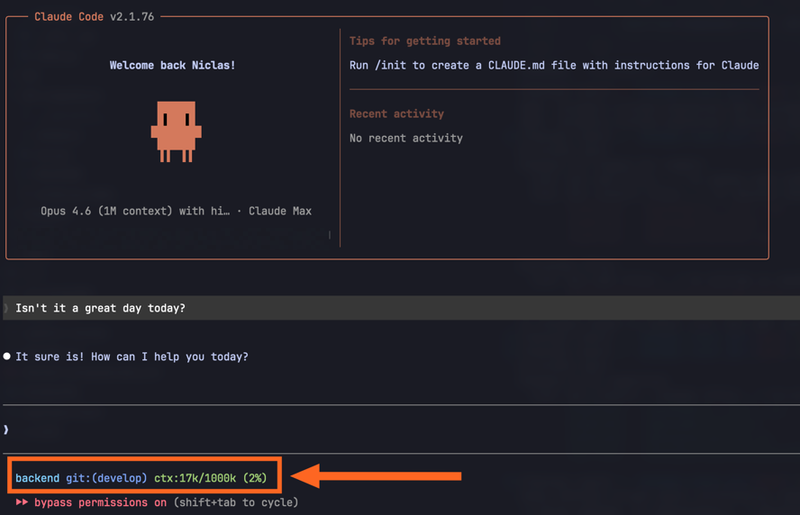
That’s it already
I would say my setup is unspectacular, but I get along well with most of the defaults. And besides, I don’t want to commit too much to one tool, since next month a different provider will probably have the best product again and we’ll all have to switch…